I was trying to reproduce an issue posted on the forums @ (http://forums.iis.net). As with many posts, I mention use Process Monitor. Here is a perfect example.
Find out what PID (process ID) in task manager
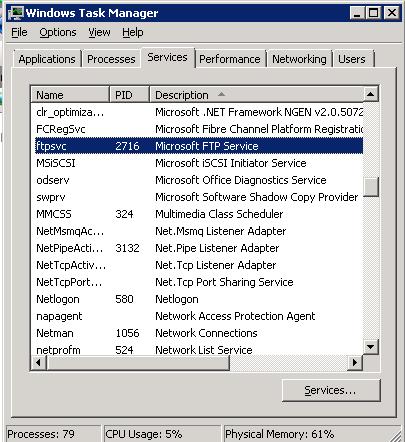
Open Process Monitor and isolate the PID (This helps cutdown on noise)
Reproduce the issue. (In my case, notice the highlighted line, it’s looking for c:domainsftprootssuser1). I have the FTP 7.0 service running on a domain controller. It means I need to create the SS (NetBIOS name) as a virtual directory for user isolation. I don’t recommend running FTP on a domain controller, so this is for demo purposes. PS: Once I added the SS virtual directory, I was able to use FTP user isolation.
Here is an article how to setup FTP 7.0
http://learn.iis.net/page.aspx/305/configuring-ftp-user-isolation/
I thank Mark for creating Process Monitor!
Cheers,
Steve Schofield
Microsoft MVP – IIS
Good article Steve. I saw that my IIS was looking for D:FTPRootLocalUserusername – if Anyone is having this same problem, try creating a LocalUserusername directory in the ftproot.
Excellent ! Helped me perfectly to find the obvious ?
Thanks for the article. Now on to the real question: I do not need user isolation (as demonstrated here), how can I configure IIS to not attempt this feature (search for a user directory – I do not have one, do not intend to create one)?
Maybe nice for anyone else…
Check wheter there are multiple FTP sites running on the machine (under IIS)
If they both use the same IP, this
is where your error comes from. ?
Playing around with this error myself
learned me that is not possible.
Hope it helps anyone out there!
I know very little about IIS but am trying to do this exact thing. I did what you said on this post and noticed that mine was adding WCSusername where wcs is our domain. I added a Virtual Directory to the FTP site and pointed it back to the root folder but that didn’t seem to work. Am I doing that right or am I way off?
This is great. It didn’t work for me but I had no idea I could get that much information from Process Monitor so that will be useful for future troubleshooting.
One thing to check if this solution doesn’t work is to drill down into your sites and check ftp authorization settings.
For people learning IIS remember that there are a lot of different levels where things can be set, my problem was not at the main level, not at the site level, but below that in aspnet and localuser ftp authorization.
Thank you I ahd the same problems.
I have the same error 530 problem however nothing is logged by process Monitor. I followed the instructions in http://learn.iis.net/page.aspx/305/configuring-ftp-user-isolation/ precisely but I cannot login, even with the administrator account. It keeps saying home directory inaccessible. Do you have any other suggestions?
Thank you for the article. I managed to get the default FTP site up and running with your information. Turns out the folder permissions were wrong.
Then I added a virtual folder (not visible to browsers) and add some security to it. Just basic authentication with a user that has been created on the local server. But I keep getting an error about the home directory being inaccessible.
My settings clearly state that isolation should not be used.
Any idea of where I could look? PerfMon says that nothing failed.
Thank you
Thanks Mans. That worked like charm.
New FTP with IIS 7.5 has many good features and better manageability. Just create user and folder in FTP Home directory. No need to create virtual directory and no need to set user security settings. Enable the isolation and everything works like charm.
Thank you Guys.
Very nice tip.